100
One to three light apps
From $2.99/mo
2vCPU
2 GBRAM
40 GBStorage
10 TBTransfer
1 IPv4 + 1 /128IP addresses

Run the tools you choose on infrastructure you control in Wolverhampton, Ashburn or Auckland, New Zealand. Get root access, SSD storage, 2Gbps public ports and automated BGP, with regional transfer allowances.

These are the standard HYEHOST Cloud VPS plans, framed around self-hosting use cases. Lower tiers are fine for lighter stacks, while collaboration, storage, and multi-service setups generally benefit from more RAM and SSD headroom.
Monthly transfer allowances are shown on each plan. Extra transfer is $2.04 per 10 TB/month in 10 TB blocks.
| Plan | UK & US | New Zealand |
|---|---|---|
| 100 | 10 TB | 500 GB |
| 200 | 25 TB | 600 GB |
| 250 | 50 TB | 700 GB |
| 300 | 75 TB | 800 GB |
| 350 | 100 TB | 900 GB |
| 400 | 150 TB | 1,000 GB |
Extra transfer: UK & US $2.04 per 10 TB/month; New Zealand $2.50 per TB/month. Public port speeds remain 2Gbps in every region.
One to three light apps
Small team starter stack
Broader multi-service mix
Heavier app combinations
Team apps with headroom
Larger internal platforms
Important: This is not a separate self-hosting product line. It is the same HYEHOST Cloud VPS platform with the same plan family and pricing, positioned for buyers comparing self-hosted infrastructure with recurring SaaS spend.
Most teams do not get hit by one huge software bill. They get hit by ten small ones. Password management, uptime monitoring, internal docs, dashboards, Git tools, file sync, and analytics often arrive as separate SaaS subscriptions with their own seat counts, limits, and renewal dates.
Self-hosting will not remove the need to operate your stack, but it can give you stronger cost control, data ownership, and fewer surprises. If your workloads are predictable and your team is comfortable running Linux services, a VPS often becomes the cleaner long-term home.
A modest five-person stack can reach this range quickly once multiple paid tools are involved.
200 is a strong starting point for small self-hosted stacks that need room beyond a single lightweight service.
This page is aimed at buyers searching for self-hosted infrastructure, not just generic VPS hosting. The platform is the same HYEHOST Cloud VPS range, but the fit is very different when you are planning around apps, users, and software spend.
Run Nextcloud, Seafile, or file portals for team documents, shared folders, calendars, and lightweight collaboration on infrastructure you control.
Host Vaultwarden or similar credential tooling for internal teams, labs, and private account stores without paying per seat from day one.
Self-host Gitea, Forgejo, webhooks, runners, package mirrors, and companion services for smaller engineering workflows.
Deploy Uptime Kuma, Grafana, Prometheus, Plausible, Umami, and status tools for internal observability with clearer ownership.
Run BookStack, Wiki.js, private dashboards, or internal portals to keep operational knowledge in one place and off fragmented SaaS tools.
Host cron-driven workflows, lightweight APIs, webhooks, reverse proxies, background services, and utility apps that support the rest of your stack.
Included with your service in Wolverhampton, UK. Select a region above to compare its network allowance.
Install your own runtimes, containers and databases. You control the operating system and application updates.
Create rollback points before upgrades and manage your backup schedule through the panel.
Public connectivity in your selected region, with transfer allowance shown on each plan.
Your plan sets the allowance. Add extra transfer when you need it.
Configure your BGP session through the HYEHOST panel, without waiting for manual setup.
Connect your VMs privately for unmetered internal traffic between application services.
Included on Wolverhampton services to help protect your public-facing workloads.
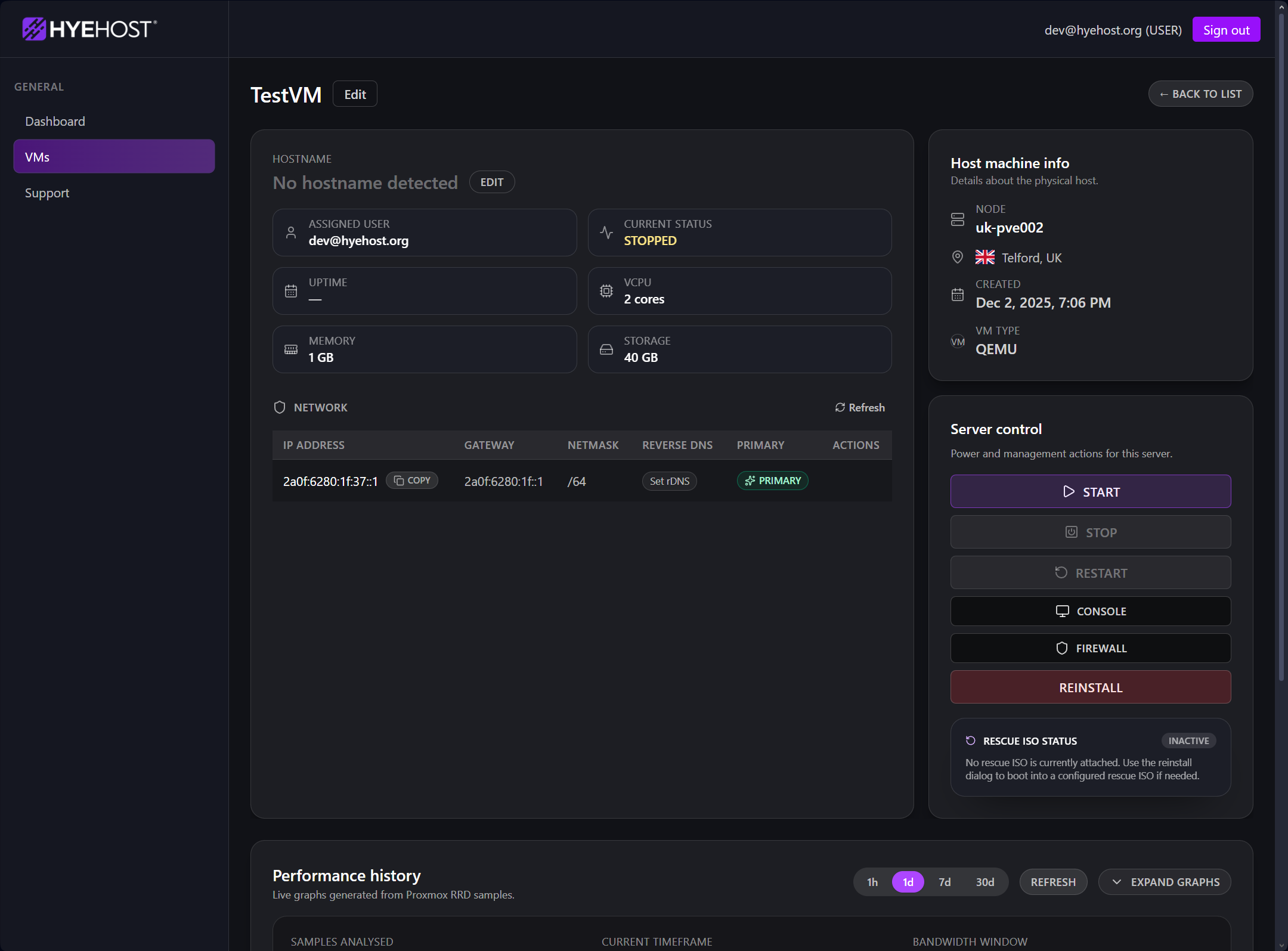
Self-hosting is much easier when the infrastructure layer is straightforward. HYEHOST Cloud VPS gives you the core operational pieces in one place: power actions, rebuilds, console access, snapshots, rescue, graphs, and billing. That keeps the provider side simple while you focus on the application layer.
If you are building something more Windows-heavy, see Windows VPS. If the goal is persistent AI agent workloads, see Clawbot VPS and Hermes Agent VPS.
Plan numbers are shared across all three regions. Select your deployment location when ordering.

Host closer to US East Coast users and North American customers. Ashburn is a practical location for business apps, APIs and regional services.

Keep services close to UK users and European audiences. Our Wolverhampton home region is a practical choice for local businesses, client hosting and production apps.

Reach New Zealand, Australian and Asia-Pacific audiences from Auckland. A regional base for apps, APIs and services across Oceania and nearby Asian markets.
Self-hosting is not automatically better than SaaS. It becomes attractive when you care about ownership, predictable recurring spend, and having the freedom to combine several tools on infrastructure you control.
Password management, DNS filtering, dashboards, lightweight storage, and utility apps are often the cleanest entry point for self-hosting.
Docs, Git, uptime monitoring, analytics, and internal portals can be grouped on one or two VPS instances rather than fragmented across separate vendors.
Teams that want stronger control over data residency, update windows, access patterns, and system design often prefer self-hosting even when the raw savings are secondary.
The tradeoff is not just price. It is convenience versus control. For the right team, self-hosting on Cloud VPS becomes easier to justify as the number of paid tools grows.
| Area | Typical SaaS approach | Self-hosting on HYEHOST VPS |
|---|---|---|
| Billing model | Often per seat, per feature tier, or per app. | Flat monthly infrastructure pricing with your own software choices on top. |
| Data location | Set by the provider and their platform layout. | You choose where the app runs and how the data is stored on your VPS. |
| Flexibility | Limited to the feature set and workflows the vendor allows. | Root access lets you shape the stack, dependencies, proxies, databases, and integrations. |
| Operations | Lower admin effort, but less control when change is needed. | You take on more responsibility, but gain direct control over updates, backups, and architecture. |
| Best fit | Fast onboarding, low-touch teams, or apps you do not want to manage yourself. | Teams that want ownership, predictable recurring spend, privacy, and a custom internal stack. |
These are the practical questions most buyers ask before they move even a small internal stack away from SaaS.
No, but basic Linux familiarity helps. Many self-hosted stacks are deployed with Docker Compose, and the infrastructure side stays straightforward when the VPS layer is predictable.
That depends on the apps and how busy they are. Lightweight tools can share one smaller VPS, while collaboration suites, storage-heavy apps, and busy databases normally need more RAM, disk, and CPU.
No. This page is a self-hosting focused landing page for the same Cloud VPS plans shown on the main Cloud VPS page.
Yes. Many teams start with a smaller VPS for one or two services, then move to a larger plan as the app count, storage needs, or user base grows.
Pick a Cloud VPS plan, deploy the software you actually want, and stop treating every internal tool like a separate subscription forever.